
Sign PDF Online Free
Sign PDF documents with a drawn, typed or uploaded signature, right in your browser.
- No upload
- No watermark
- No sign-up
- Phone, tablet and computer
Sign PDF documents online for free, right in your browser. Draw your signature with a mouse or finger, type it in a handwriting style, or upload a photo of it, then place it anywhere on the page. There is no upload, no sign-up and no watermark.
How to Sign PDF Files Online in 4 Steps
Signing a document takes less than a minute, from opening the file to downloading it.
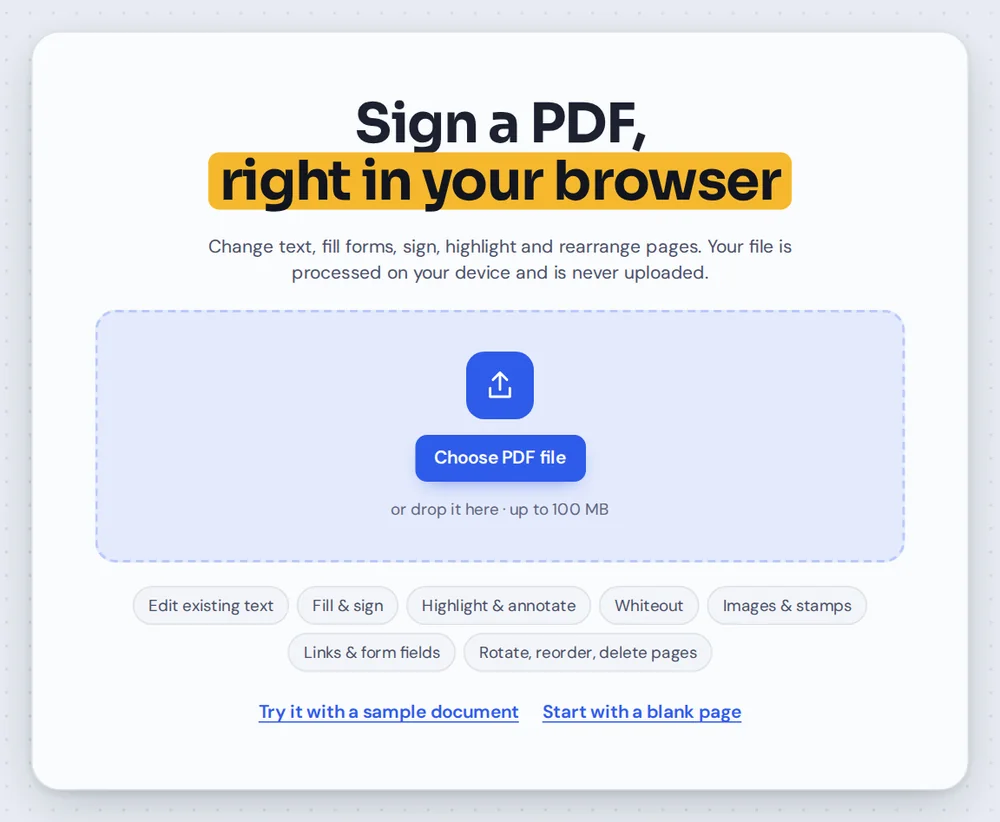
Open your PDF
Click Choose PDF file or drag your document onto the editor above. It opens straight away, because nothing is uploaded to a server.
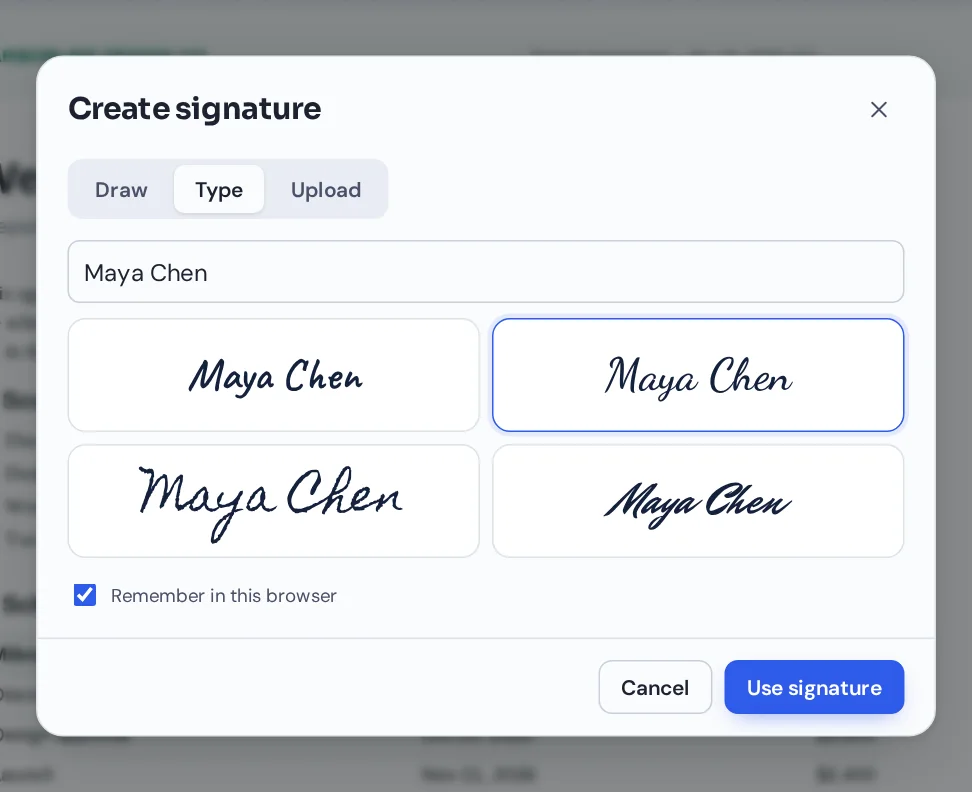
Create your signature
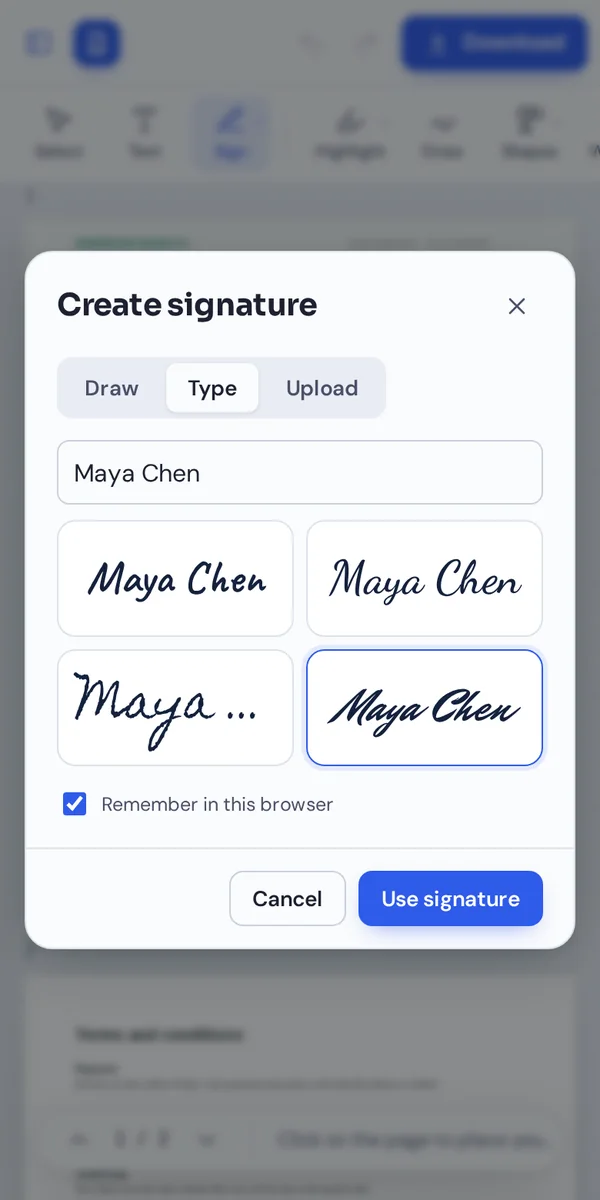
The signature window opens by itself. Draw your signature, type your name and pick a handwriting style, or upload a photo of your signature on paper.
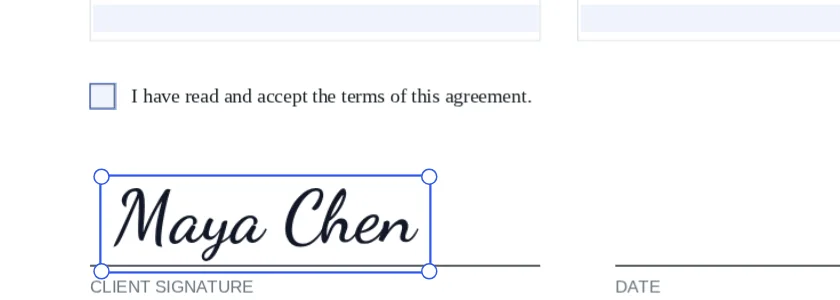
Place it on the page
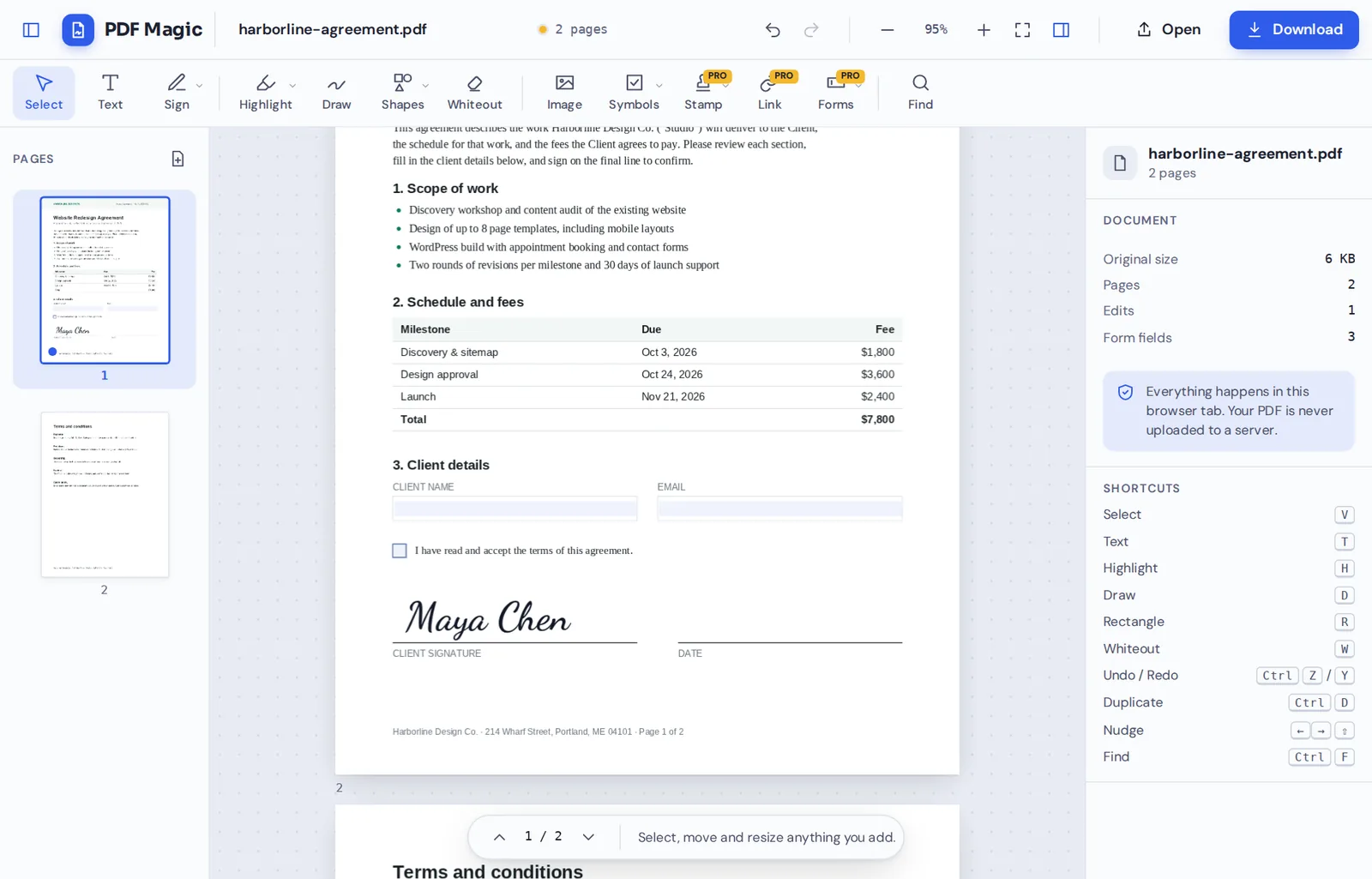
Click where you want to sign PDF pages, then drag the corners to make the signature bigger or smaller. Add your initials, the date or a checkmark the same way.
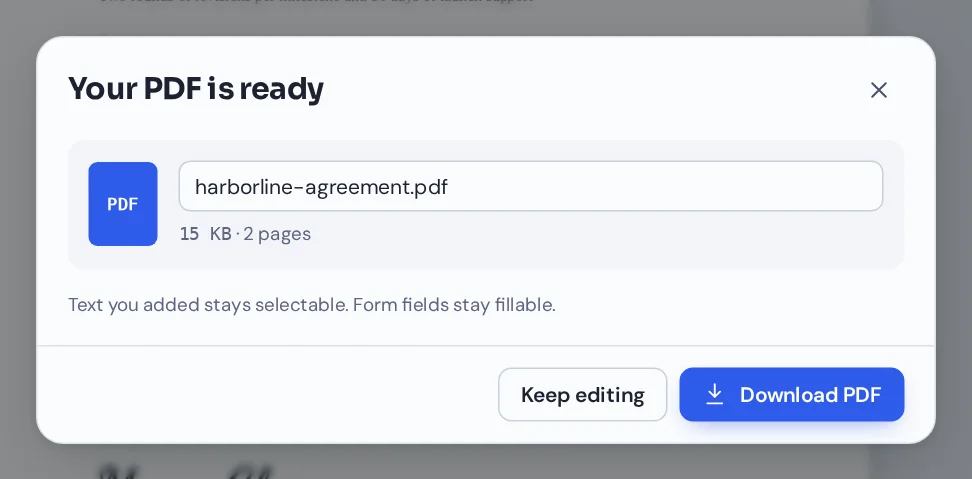
Download the signed file
Click Download and name your file. The signed PDF opens in any PDF reader, and there is no watermark on it.
Is It Legal to Sign PDF Documents Electronically?
An electronic signature is any mark you add to a document to show you agree to it: a drawn signature, your typed name or a picture of your handwritten signature. When you sign PDF files with PDF Magic, the editor adds your signature to the page as an image, the same way you would sign on paper.
In many countries, electronic signatures are legally valid for most everyday documents. In the United States, the ESIGN Act (2000) gives them the same effect as handwritten signatures. In the European Union, the eIDAS Regulation (2014) does the same. Contracts, rental agreements, job offers and forms are usually fine to sign PDF style online.
Some documents still need a handwritten or certified signature, such as wills or certain court and government papers. The rules depend on your country and the other party, so check with them if you are unsure. This page is general information, not legal advice.
Electronic signature
Your drawn, typed or uploaded signature placed on the page. This is what PDF Magic creates, and it works for most everyday paperwork.
Digital signature
A certificate-based signature that proves who signed and shows if the file changed later. PDF Magic plans to add these in a future Business plan.
Wet signature
Signing a printed page by hand and scanning it. Still needed for a few documents, but slower for everything else.
Three Ways to Sign PDF Files, Explained
Pick whichever way feels most like your real signature. You can create as many signatures as you like and reuse them.
Draw your signature
The most natural way to sign PDF documents on a phone or tablet.
- Mouse, finger or stylus
Sign in the box with whatever you have. The line gets thinner when you move fast and thicker when you move slowly, like real ink.
- Three ink colors
Choose black, blue or green ink.
- Clear and try again
Not happy with it? Click Clear and draw it again before you place it.
Type your signature
The quickest way to sign PDF forms on a computer.
- Four handwriting styles
Type your name and pick one of four handwriting styles, from neat to flowing.
- Initials too
Create short initials in the same way for documents that need them on every page.
Upload your signature
Use your real handwritten signature from paper.
- Photo or scan
Sign a piece of white paper, take a photo, and upload it.
- Background removed for you
PDF Magic removes the white paper background automatically, so only your ink appears on the document.
Place, reuse and finish
Everything that happens after you create your signature.
- Place and resize
Click the page to place your signature, drag it into position and resize it from the corners so it sits on the signature line.
- Saved signatures
Keep up to four signatures in your browser and sign PDF files again with one click. They are stored only on your device, and you can remove them any time.
- Dates, checkmarks and text
Add today's date, tick boxes and type your name or title next to your signature.
- Fill in the form first
If the PDF has fillable fields, click them to type your details before you sign.
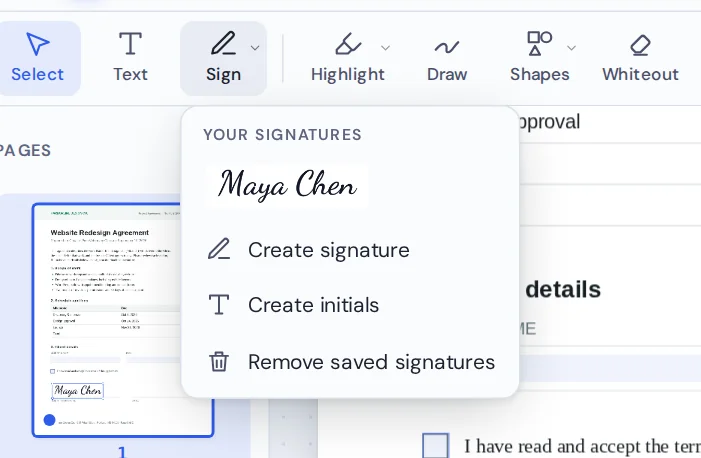
Your saved signatures appear at the top of the Sign menu. Click one, then click the page, and it is placed. It is the fastest way to sign PDF documents you receive often, such as timesheets and invoices.
Everything Else You Need When You Sign PDF Forms
Signing is often only part of the job. These tools work in the same editor, on the same document.
Add the date
Place today's date next to your signature in one click.
Add initials
Initial every page of a contract or agreement.
Fill in forms
Type into the form fields and tick checkboxes before you sign.
Add checkmarks
Tick boxes on paper-style forms that have no fillable fields.
Add text
Type your name, title or any note anywhere on the page.
Edit the PDF
Change text, highlight, add images and reorder pages.
Sign PDF Files Privately: Your Signature Never Leaves Your Device
Your signature is personal, so it should stay with you. When you sign PDF documents here, the file and your signature are handled inside your own browser tab. Nothing is sent to our servers or stored by us.
Saved signatures are kept only in your browser on this device. Clear them from the Sign menu whenever you like, or turn off "Remember in this browser" when you create one on a shared computer.
- 0files uploadedYour PDF stays on your device.
- 0signatures on our serversOnly you can see your signature.
- 0accounts neededOpen the page and sign.
Sign PDF on iPhone, Android or Computer
- Windows
- Mac
- Linux
- Chromebook
- iPhone
- iPad
- Android
You can sign PDF files on any device with a modern browser, with nothing to install. On a phone or tablet, draw your signature with your finger for the most natural result.
Someone emailed you a form? Open it on your phone, sign PDF pages in seconds, and send it back without printing or scanning anything.
Documents People Sign PDF Online Every Day
If it arrives as a PDF and needs your signature, you can finish it here.
Contracts and agreements
Service contracts, NDAs and freelance agreements, with initials on every page.
Rental and property forms
Leases, rental applications and move-in checklists.
Job offers and HR forms
Offer letters, onboarding forms and timesheets.
School forms
Permission slips, enrollment forms and course agreements.
Invoices and approvals
Approve an invoice, a quote or a purchase order.
Medical and insurance forms
Consent and claim forms, kept private because nothing is uploaded.
Tips to Sign PDF Documents That Look Right
- Draw slowlyA slower hand gives smoother lines. On a phone, use your finger or a stylus rather than a mouse.
- Upload on plain white paperUse a dark pen and good light, so the background is removed cleanly.
- Match the signature lineZoom in and resize your signature so it sits on the line when you sign PDF forms.
- Add the dateMany forms ask for a date next to the signature. Add it from the Symbols menu.
- Undo anythingCtrl+Z removes the last change if a signature lands in the wrong place.
- Keep the originalSave a copy of the unsigned file, in case you need to sign again.
Sign PDF: Frequently Asked Questions
Answers to what people ask most before they sign.
How do I sign a PDF online?
Open your PDF above, choose Sign and draw, type or upload your signature. Click the page to place it, resize it, then click Download.
Can I add a signature to a PDF for free?
Yes. Creating a signature, placing it and downloading the signed file are free, with no account and no watermark.
How do I electronically sign a PDF?
Create your signature once with your mouse, finger or a photo of it, click where it goes and download. The signed PDF is ready to send by email.
Can I sign a PDF without printing it?
Yes. You sign right on your screen and download the signed file, so there is no printing or scanning.
How do I add a digital signature to a PDF?
You can add an electronic signature, which is an image of your signature placed on the page. Certificate-based digital signatures are coming to PDF Magic Business.
Can I sign a PDF on my phone?
Yes. Open this page in your phone's browser, draw your signature with your finger and tap the page to place it.
Is an electronic signature on a PDF legally valid?
In many countries, including the US, UK and EU, electronic signatures are legally valid for most everyday agreements. Some documents, such as wills, may need a handwritten or certified signature, so check the rules where you live.
How do I request a signature on a PDF?
Send the PDF to the other person and ask them to open it here and sign it. Built-in signature requests are coming to PDF Magic Business.
Ready to Sign PDF Files?
No account, no upload and no watermark: open your document above and sign it in under a minute.
Open the editorPDF Magic is the easy, private way to sign PDF documents online. Choose your file and sign PDF pages today.